A CDN is often sold as an instant, universal speed fix, and that framing causes two opposite mistakes: sites that skip a CDN when it would genuinely help, and sites that add one expecting a dramatic transformation and wonder why almost nothing changed. A CDN solves specific problems, mainly network distance and static-asset delivery, and leaves other problems, like slow PHP or database execution, untouched. This guide, part of the WordPress Speed series, covers what a CDN changes, what it doesn’t, and how to test one honestly.
What a content delivery network is
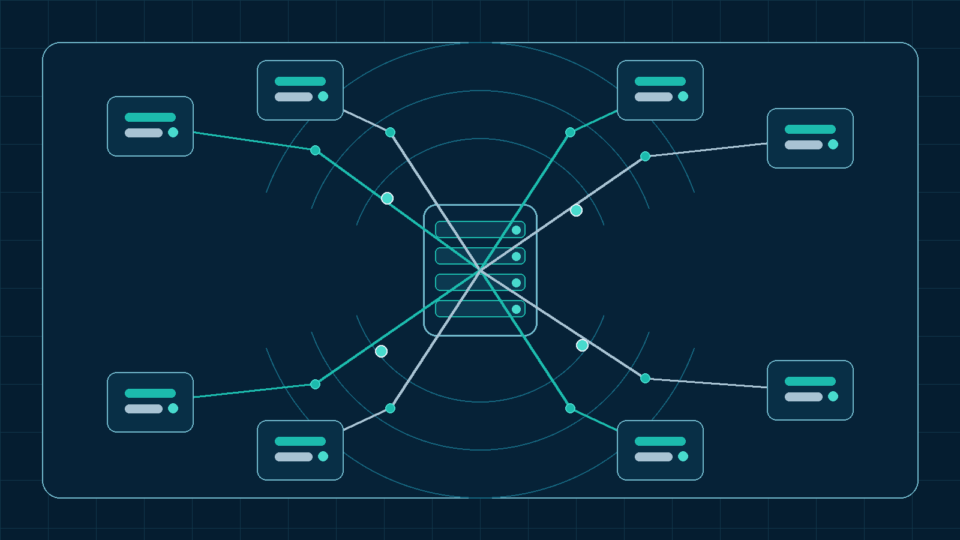
A content delivery network (CDN) is a geographically distributed network of servers that can store and serve copies of a site’s content from locations closer to visitors, rather than every request traveling to a single origin server. The goal is reducing the network distance, and therefore latency, between a visitor and the requested content.
CDN edge locations and points of presence
A CDN operates from many “points of presence” (PoPs) or edge locations spread across regions. A visitor’s request is routed to a nearby edge location rather than the original hosting server, provided that location has, or can obtain, a valid cached copy.
Origin server versus CDN edge
The “origin” is your actual WordPress hosting server, where files, database, and PHP execution live. The CDN edge is a separate layer in front of it. For content the edge can serve from cache, the origin is never contacted; for anything it can’t, the request still reaches the origin, and the CDN offers no benefit beyond the network route taken getting there.
Static assets versus dynamic HTML
Static assets, images, CSS, JavaScript, fonts, are identical for every visitor and naturally well-suited to CDN caching. Dynamic HTML, particularly logged-in sessions or e-commerce carts, is generated per-visitor: it either can’t be cached at the edge, or requires careful configuration to avoid leaking one visitor’s content to another.
Full-page edge caching
Some CDN configurations cache entire rendered HTML pages at the edge, serving a complete page without contacting the origin. This can meaningfully reduce TTFB for cacheable pages, but requires the same exclusions as WordPress’s own page caching, or it risks serving one visitor’s content to another.
DNS-based and reverse-proxy CDN setups
CDNs are commonly integrated one of two ways: a DNS-level setup, where DNS records point directly to the CDN, which proxies requests to the origin, or a plugin-based setup rewriting specific asset URLs while leaving base DNS and HTML unchanged. Full-page edge caching generally requires the DNS-based approach; URL rewriting is limited to static assets.
Pull CDN versus push CDN concepts
A pull CDN fetches and caches content automatically the first time it’s requested, requiring little setup. A push CDN requires content to be uploaded to the CDN in advance, giving more direct control at the cost of more maintenance work. Most WordPress-focused CDN integrations use a pull model, since it needs far less ongoing management.
How CDN caching works
When a request reaches the CDN edge, it checks whether it already holds a valid, non-expired cached copy. If so, it serves that copy directly. If not, it retrieves the content from the origin, stores a copy per the caching rules in place, and serves it, benefiting future requests until the copy expires or is purged.
Cache keys
A cache key is the set of request characteristics, typically the URL and sometimes device type or cookie presence, that the CDN uses to decide if two requests count as “the same.” A key ignoring a meaningful factor can serve the wrong content; one including irrelevant factors, like a tracking parameter, fragments the cache and reduces hit rate.
Cache headers
HTTP response headers, especially Cache-Control, tell browsers and shared caches how a response may be stored and for how long. Provider rules can override or extend those headers, so verify the effective policy at the edge rather than relying only on a dashboard setting.
Cache-Control
The Cache-Control header supports directives such as public, private, no-store, and max-age. Shared caches can also use s-maxage when a different freshness lifetime is needed at the CDN than in the browser. Static assets often suit long public caching, while logged-in or personalized HTML should not be stored in a shared cache.
Browser caching versus CDN caching
These are different caching layers, though often configured through the same Cache-Control headers. Browser caching stores a copy locally on one visitor’s device; CDN caching stores a shared copy at an edge location, benefiting every visitor routed there. A resource can be cached in both places at once, and clearing one does not clear the other.
Cache HIT, MISS, BYPASS, and EXPIRED
Many CDNs expose a provider-specific cache-status response header. Labels vary, but commonly include HIT for a cached response, MISS for an origin fetch, and a bypass or stale/revalidation state. Check the provider documentation for the exact header and meanings; this is more reliable than assuming caching is active from configuration alone.
Geographic latency
The physical distance data travels adds real, physics-limited latency, roughly proportional to distance, regardless of origin speed. A CDN reduces this latency component for cacheable content by serving from a location closer to the visitor, but does nothing for the portion of latency involved in reaching the origin for anything not servable from cache.
Server location and audience location
If a site’s audience is concentrated near its origin server, a CDN’s latency benefit is inherently smaller, since the origin is already close to most visitors. A CDN provides the most benefit for globally or widely distributed audiences relative to a single origin location.
TLS connection and network effects
DNS lookup, connection establishment, and TLS negotiation add latency before content transfer. A nearby CDN edge can shorten the visitor-to-edge portion, but an uncacheable request still needs an edge-to-origin trip, so the final result depends on both network legs and the provider architecture.
Images, CSS, JavaScript, and font delivery
These asset types are the most straightforward, lowest-risk candidates for CDN caching, since they’re identical for every visitor and rarely contain personalized data. As covered in How to Optimize Images and the LCP Element in WordPress and WordPress Fonts, CSS, Scripts, and Plugin Weight Explained, file size and loading strategy still matter; a CDN changes where a file is served from, not how optimized it is.
HTML edge caching
Caching full HTML pages at the edge offers the largest potential TTFB improvement, since the origin isn’t contacted for a cache hit, but it requires the CDN to correctly distinguish generic page views from personalized or logged-in ones, using cookies, headers, or exclusion rules.
Logged-in users
Logged-in sessions typically must not be served from a shared HTML cache, whether at the CDN or the plugin-based layer covered in WordPress Caching Explained: Which Layers You Actually Need, since doing so risks showing one visitor’s session or personalized data to another.
WooCommerce carts, checkout, and personalized pages
Cart, checkout, account, and personalized-pricing pages must be excluded from full-page CDN caching for the same reason; a shared cached copy risks showing one customer’s information to another. Reputable WooCommerce-compatible CDN integrations typically build in these exclusions, but confirm they’re actually active rather than assuming.
Cookies and cache exclusions
CDNs commonly use specific cookies (a session cookie, a cart cookie) as a signal to bypass cache entirely. Misconfigured handling, either missing a cookie that should trigger a bypass, or bypassing unnecessarily for one that doesn’t indicate personalized content, causes either a privacy risk or needlessly poor hit rates.
Query strings
URLs with query parameters (tracking codes, filters, sort orders) can be treated as entirely distinct cache entries by default, fragmenting otherwise identical content into many rarely-reused entries. Some CDNs allow ignoring known-irrelevant parameters for cache-key purposes, improving hit rates without risking the wrong content for parameters that do matter.
CDN purging and cache invalidation
When content changes, cached copies at the edge need purging or they’ll keep serving stale content until they expire naturally. Most WordPress CDN integrations trigger a purge automatically on updates, but this adds a layer beyond WordPress’s own purging; confirm it works by checking cache headers after an edit rather than assuming.
Origin shielding
Origin shielding designates one CDN location as an intermediary cache layer between other edges and the origin, so a cache miss at one edge doesn’t necessarily require a fresh request all the way to origin; it can be served from the shield instead. This reduces origin load during traffic spikes or requests from many regions at once.
Image optimization services
Some CDNs include built-in image optimization, resizing, format conversion, and compression at the edge, rather than requiring a separate plugin. This reduces ongoing manual work, but it’s a distinct feature from basic caching worth evaluating separately, since not every CDN includes it, and quality varies between providers.
Web application firewall and bot filtering
Many CDN providers also offer WAF and bot-filtering features at the same edge layer, filtering unwanted traffic before it reaches the origin. This is a security-adjacent benefit distinct from performance caching, covered from a broader angle in WordPress Security Hardening Checklist.
Why a CDN cannot fix slow PHP or database execution
For any request not served from cache, the request still reaches the origin and goes through the full WordPress cycle: PHP execution, database queries, page assembly. A CDN doesn’t speed any of that up; it only affects the network path and whether a cached shortcut exists. As covered in WordPress Hosting, PHP Version, and the Server Performance Floor, execution speed is set by hosting, PHP, and database performance, none of which a CDN touches.
Why a CDN may not improve every metric
A CDN’s benefit concentrates in network latency and, with full-page caching, TTFB. It has little effect on metrics driven by front-end rendering, JavaScript execution, or layout, covered in Interaction to Next Paint in WordPress and Cumulative Layout Shift in WordPress, since those depend on what happens after content arrives, not where it was served from.
CDN effects on TTFB and LCP
TTFB for cacheable requests can improve meaningfully with a CDN, particularly for distant visitors. LCP can benefit indirectly, through faster TTFB and through faster delivery of the LCP resource itself if it’s a cacheable image, as covered in Largest Contentful Paint in WordPress. Neither improvement is guaranteed; it depends on cache hit rates and visitor geography.
Third-party scripts that a CDN does not control
Analytics, advertising, and other third-party scripts usually come from their providers’ infrastructure, not your CDN. Your CDN therefore cannot directly control their transfer, execution, or main-thread cost.
Testing before and after enabling a CDN
As covered in How to Measure WordPress Speed Before Making Any Changes, record a baseline, including TTFB, before enabling a CDN, then compare the same metrics afterward under matching conditions. Check the cache status header to confirm requests are actually served from cache before attributing any change to the CDN.
Testing first view and repeat view
A visitor’s first request for given content may be a cache miss, fetched fresh from origin, while a later visitor requesting the same content from the same edge gets a cache hit. Testing only once can misrepresent typical performance; check both a cold and a warm request against the same edge for a fuller picture.
Common CDN configuration mistakes
- Enabling full-page HTML caching without excluding logged-in sessions, carts, or personalized pages
- Assuming a CDN will fix slow TTFB caused by PHP or database execution rather than network distance
- Not checking the cache status header, assuming caching is active when it may not be
- Fragmenting the cache by including irrelevant query parameters in the cache key
- Forgetting to confirm content updates actually trigger a CDN purge
- Expecting uniform improvement across every metric rather than the specific ones a CDN affects
Practical CDN evaluation checklist
- Confirm where your audience is located relative to your origin server
- Record a baseline (TTFB and other metrics) before enabling a CDN
- Decide whether full-page HTML caching suits your site’s dynamic content
- Confirm logged-in, cart, checkout, and personalized pages are excluded from shared caching
- Check the cache status header to confirm requests are actually served from cache
- Test both cold and warm requests
- Confirm content updates trigger a CDN purge correctly
- Re-test the same metrics after enabling the CDN under matching conditions
Key Takeaways
- A CDN primarily reduces network latency for cacheable content by serving it closer to the visitor; it does not speed up PHP or database execution.
- CDN caching, browser caching, and WordPress’s own page caching are three distinct layers, even though they interact through similar Cache-Control headers.
- Full-page HTML edge caching offers the largest potential benefit but requires careful exclusions for logged-in, personalized, and e-commerce pages.
- Not every WordPress site needs a CDN; the benefit depends on audience geography relative to the origin and how much traffic is genuinely cacheable.
- Always confirm caching is active via the cache status header rather than assuming a CDN works as configured.
FAQs
Does every WordPress site need a CDN?
No. The benefit depends on audience geography relative to your origin and how much traffic is genuinely cacheable. A site with a local audience near its origin may see limited benefit, while a globally distributed audience typically benefits more.
Will a CDN fix my slow Time to First Byte?
Only the portion of TTFB caused by network distance and, for cacheable pages, avoiding the origin. If your TTFB is slow because of PHP execution, database queries, or hosting constraints, a CDN doesn’t address that cause.
Is CDN caching the same as WordPress page caching?
No. They’re distinct layers that can work together. WordPress page caching typically happens at or near the origin; CDN caching happens at edge locations distributed globally. Both need separate configuration and exclusions for logged-in and personalized content.
How do I know if my CDN is actually serving cached content?
Inspect the provider-specific cache-status response header and compare its value with that provider’s documentation. A reported cache hit is stronger evidence than assuming a dashboard rule is working.
Can a CDN cache my WooCommerce cart and checkout pages?
These generally should not be served from a shared CDN cache, since doing so risks exposing one customer’s cart or data to another visitor. Confirm your setup properly excludes these page types rather than assuming defaults handle it.